
Veracross has changed the way that you add scopes. We hope to make this a little easier.
For new schools only
Please first add the new OAuth partner:
- Login to Veracross/Axiom and go to the "Identity and Access Management" homepage
- From the IAM homepage, add SchoolCal as an "integration partner".
- SchoolCal can be found in the list of partners in the middle of the page, towards the bottom of the list.
- Press the "Start Integration" button. NOTE: you may need to add the security role of "OAuth_App_Admin" and refresh the page in order for the "start integration" button to appear.
- You should be presented with a screen that shows you the SchoolCal name, and my email address. From there, press the "Add OAuth Application" button.
For all schools:
- Log in to Veracross and navigate to the Identity & Access Management page.
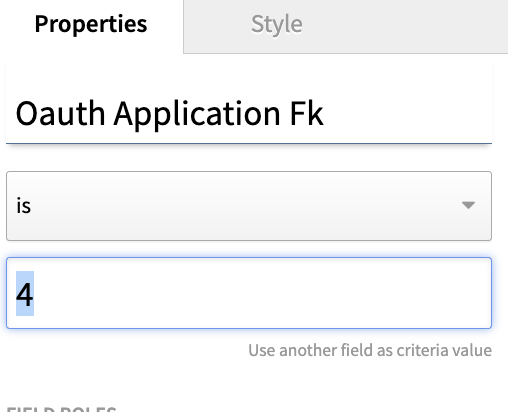
- Click the SchoolCal instance (on the left) and grab the number of your instance which may be found in the URL. Every school will have a unique number for their SchoolCal Oauth Application FK:

- Click on this query: https://axiom.veracross.com/#/query/1522276 and edit the "Oauth Application Fk" to match the number found in the URL for your SchoolCal instance (see screenshot above) and run the query.
- From the lightning bolt menu, batch update the status of all to be "Yes".
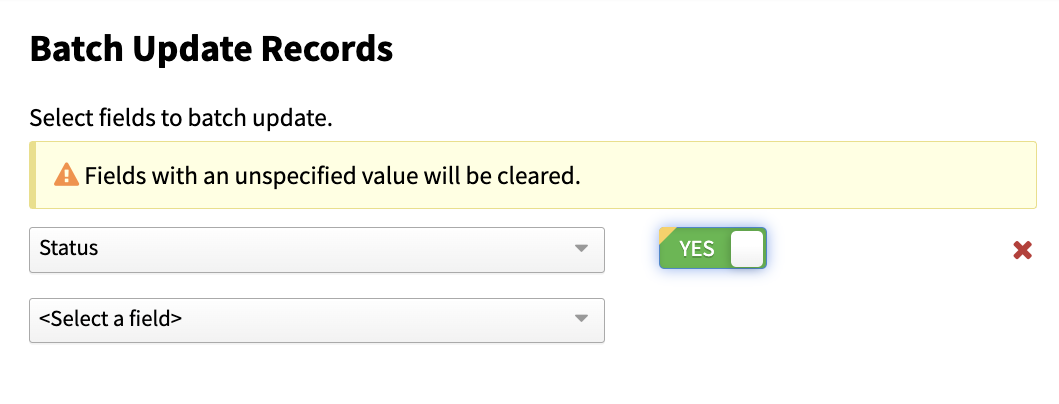
That will enable all of the scopes
The scopes list is updated from time to time so please verify that your list is accurate:
- List Academics: Calendar Rotation Days
- Read Academics: Calendar Rotation Day
- List Academics: Class Schedules
- List Academics: Class Meeting Times
- Read Academics: Class Meeting Time
- List Academics: Classes
- Read Academics: Class
- List Academics: Block Groups
- Read Academics: Block Group
- List Academics: Configuration - Block Schedules
- Read Academics: Configuration - Block Schedule
- List Academics: Configuration - Block Meetings Times
- Read Academics: Configuration - Block Meeting Time
- List Academics: Configuration - Blocks/Periods
- Read Academics: Configuration - Blocks/Period
- Read Academics: Blocks by Group
- List Academics: Blocks by Group
- List Academics: Grading Periods
- Read Academics: Grading Period
- List Academics: Rotation Days
- Read Academics: Rotation Day
- List Academics: Courses
- Read Academics: Course
- List Academics: Departments
- Read Academics: Department
- List Academics: Enrollments
- Read Academics: Enrollment
- List Academics: Classes - Permissions
- Read Academics: Classes - Permission
- List Academics: Rooms
- Read Academics: Room
- List Academics: Subjects
- Read Academics: Subject
- List Athletics: Team - Coaches
- List Athletics: Rosters
- Read Athletics: Roster
- List Athletics: Sports
- Read Athletics: Sport
- List Athletics: Team Practice Schedules
- List Athletics: Teams
- Read Athletics: Team
- List Class - Permissions
- List Classes
- Read Classes
- List Courses
- Read Course
- List Event Groups
- Read Event Group
- List Events: Athletics
- Read Events: Athletic
- List Events: Attendance
- Read Event: Attendance
- Create Event (for Event Manager customers)
- List Events
- Read Event
- Update Event (for Event Manager customers)
- List Extended Care: Class Meeting Times
- Read Extended Care: Class Meeting Time
- List Extended Care: Classes
- Read Extended Care: Class
- List Extended Care: Courses
- Read Extended Care: Course
- List Extended Care: Registrations
- Read Extended Care: Registration
- List Programs: Class Meeting Times
- Read Programs: Class Meeting Time
- List Programs: Classes
- Read Programs: Class
- List Programs: Courses
- Read Programs: Course
- List Programs: Enrollments
- Read Programs: Enrollment
- List Resource Reservations: Reservations
- Read Resource Reservations: Reservation
- List Resource Reservations: Resources
- Read Resource Reservations: Resource
- List Staff/Faculty
- Read Staff/Faculty
- List Students
- Read Student
- List Summer: Class Meeting Times
- Read Summer: Class Meeting Time
- List Summer: Classes
- Read Summer: Class
- List Summer: Courses
- Read Summer: Course
- List Summer Enrollments
- Read Summer Enrollment